- plt.pie()
- documentation: https://matplotlib.org/stable/gallery/pie_and_polar_charts/pie_features.html
- five "generic font family names" (serif, monospace, fantasy, cursive, and sans-serif)
- reference: fontfamily documentation: https://matplotlib.org/stable/users/explain/text/fonts.html
- pie chart 속성
Pie charts — Matplotlib 3.10.3 documentation
Demo of plotting a pie chart. Swap label and autopct text positions Use the labeldistance and pctdistance parameters to position the labels and autopct text respectively. labeldistance and pctdistance are ratios of the radius; therefore they vary between 0
matplotlib.org
color_pallette_name = ['#color1', '#color2'...]

plt.figure(figsize = (10, 10))

plt.pie(
  value,
  labels = labels,     #부채꼴 조각 이름
  autopct = '%0.f%%',  #부채꼴 안에 표시될 숫자 형식
  startangle=100,      #부채꼴의 시작 각도 설정(90인 경우 12시)
  explode=[0, 0.05],   #이 경우 2번째 조각만 파이를 벗어남, 부채꼴이 파이 중심에서 벗어나는 정도 설정
  shadow=True,         #putting in shadow
  colors = [color_pallette_name[1],color_pallette_name[0]]  #name can be 'r', or '#ffffff'
)

plt.suptitle('title', fontfamily='serif', fontsize= 15, fontweight='bold') #title
plt.title('sub title', fontfamily='serif', fontsize= 12, style='italic',loc='left') #sub-title
#fontname= 사용하려면 폰트가 업로드되어 있어야 함. 하지만 폰트 패밀리는 사용할 수 있음
#fig.text로도 문자열을 넣을 수 있음
#fig.text(x위치, y 위치, '넣을 문자열', ha='center',fontsize=15)

plt.show()
example: step by step
#make up fake data
dict_data = {'a':[1,2,3,4,3,4,4,3,3,3,3]}
df = pd.DataFrame(dict_data)
df
df['a'].value_counts()
a_reverse = pd.DataFrame(df['a'].value_counts()).T
a_reverse
pie_color = ['r', 'darkred','purple','yellow']

plt.figure(figsize = (5, 5))

plt.pie(
  a_reverse.loc['count'],
  labels = a_reverse.columns, #부채꼴 조각 이름
  autopct = '%0.f%%',         #부채꼴 안에 표시될 숫자 형식
  startangle=100,             #부채꼴의 시작 각도 설정(90인 경우 12시)
  explode=[0, 0.1,0,0],       #이 경우 2번째 조각만 파이를 벗어남, 부채꼴이 파이 중심에서 벗어나는 정도 설정
  shadow=True,                #putting in shadow
  colors = [pie_color[1],pie_color[0], pie_color[2], pie_color[3]]  #name can be 'r', or '#ffffff'
)

plt.suptitle('title', fontfamily='serif', fontsize= 15, fontweight='bold') #title
plt.title('sub title', fontfamily='serif', fontsize= 12, style='italic', loc='left') #sub-title
#fontname= 사용하려면 폰트가 업로드되어 있어야 함. 하지만 폰트 패밀리는 사용할 수 있음
#five "generic font family names" (serif, monospace, fantasy, cursive, and sans-serif)
#fig.text로도 문자열을 넣을 수 있음
#fig.text(x위치, y 위치, '넣을 문자열', ha='center',fontsize=15)

plt.show()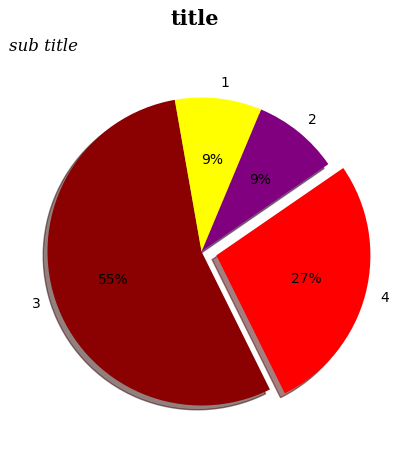
'Python_Wiki > Python_Library' 카테고리의 다른 글
| matplotlib/seaborn: heatmap 히트맵 (0) | 2025.06.06 |
|---|---|
| matplotlib: 꺾은선 그래프 line chart(fill_between) (0) | 2025.06.05 |
| matplotlib/seaborn: bar chart 막대 그래프 (0) | 2025.06.05 |
| Pandas 판다스: 판다스 기초 설명, 파일 불러오기 (0) | 2025.05.30 |
| Pandas EDA 기초 및 함수 (0) | 2025.05.20 |


